
What Is It Like to Use Memoria for Real Project Development?
Using the store-app project as a case study, exploring the real-world experience, value, and limitations of Memoria in software development.
Background: What Is store-app?
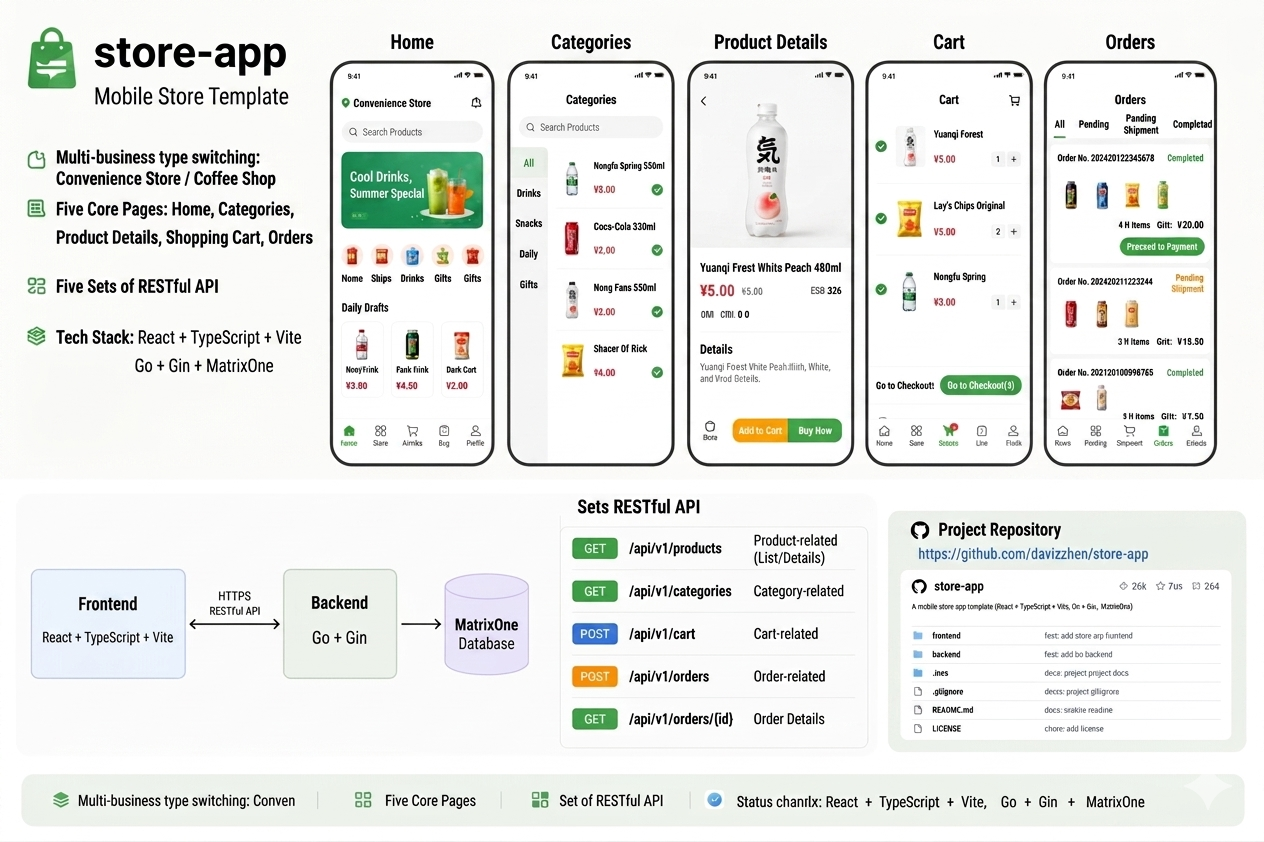
store-app is a mobile store template with a frontend built on React + TypeScript + Vite, a backend built on Go + Gin, and MatrixOne as the database. It supports switching between multiple business types (convenience store / coffee shop), and includes five pages — Home, Categories, Product Details, Cart, and Orders — with five groups of RESTful APIs on the backend. Project repository: https://github.com/daviszhen/store-app.
Memoria Memory —
019e2bfd958d7c93bd5690249e09dc37The project store-app is located at /home/pengzhen/Documents/store-app/ and is a mobile store template. Frontend: React+TS+Vite. Backend: Go/Gin. Database: MatrixOne. Contains four pages: Home / Categories / Product Details / Cart. Backend has five groups of RESTful APIs: Store / Categories / Products / Cart / Orders.
The project was built from scratch through 3 Git commits:
| Commit | Content | Scale |
|---|---|---|
549f521 first | Empty directory initialization | 1 file |
14b8efe update | Full-stack scaffold setup | 34 files, +4586 lines |
86bdfe7 add coffe | Business type switching + coffee shop seed data | 17 files, +480 / -73 lines |
Throughout the development process, Memoria ran continuously in the background as a persistent memory layer. The following sections examine its real-world performance through a series of practical scenarios.
What Kind of Information Does Memoria Capture?
1. Project Scaffold Information
In the early stages of development, Memoria automatically captured the core structural information of the project — the tech stack, page inventory, API endpoints, database table schemas, and startup procedures.
Memoria Memory —
019e2bfd958d7c93bd5690249e09dc37(Project Overview)The project store-app is located at /home/pengzhen/Documents/store-app/ and is a mobile store template. Frontend: React+TS+Vite. Backend: Go/Gin. Database: MatrixOne. Contains four pages: Home / Categories / Product Details / Cart. Backend has five groups of RESTful APIs: Store / Categories / Products / Cart / Orders.
Memoria Memory —
019e2bfdc48f7491873836727c2958a3(Database Schema)store-app database table schema: store (shop info including theme color), category (product categories), product (products), cart (shopping cart), orders (orders), order_item (order line items).
Memoria Memory —
019e2bfde1367673a841a6dc2459673d(API Endpoints)store-app API endpoints: GET/PUT /api/store for store, CRUD /api/categories for categories, CRUD /api/products for products (supports category_id filtering), CRUD /api/cart for cart (by user_id), POST/GET /api/orders for orders.
Memoria Memory —
019e2bfdcb1d77b2aef3bfe4cec86f65(Startup Procedure)store-app startup procedure: 1) Run sql/init.sql to initialize the MatrixOne database; 2) cd server && ./server to start the backend (port 8080); 3) cd frontend && npm run dev to start the frontend (port 5173).
This information was referenced repeatedly in later conversations. When I asked "what are the API endpoints for store-app?", Memoria returned the full list directly — no need to dig through the code again.
2. Three Pitfalls at Backend Startup
This is the most valuable category of content recorded by Memoria. Three specific issues were encountered when starting the backend for the first time:
Memoria Memory —
019e2c0902497323b7562d849054bcb3(Startup Issues)Three issues encountered when starting the store-app backend and their resolutions: 1) Wrong password — changed the default password in config.go to 111; 2) Conflict between AutoMigrate and init.sql foreign keys — removed AutoMigrate; 3) GORM default plural table name (categories) did not match the actual table name (category) — added NamingStrategy{SingularTable: true} configuration.
Memoria Memory —
019e2c09074e78439e32d7bda2688805(GORM Configuration Details)store-app GORM database connection configuration is in server/internal/database/database.go, using schema.NamingStrategy{SingularTable: true} to match the singular table names in init.sql. DSN format: user:password@tcp(host:port)/dbname?charset=utf8mb4&parseTime=True&loc=Local.
Each issue has its root cause and resolution recorded. If the same error crops up two weeks later, a quick glance at the memory pinpoints it — no need to troubleshoot from scratch.
Addendum: During subsequent development, another related bug was encountered — the orders table in init.sql was named orders (plural), but with GORM's SingularTable enabled, it mapped to the singular order (a MySQL reserved word), requiring backtick wrapping.
Memoria Memory —
019e315014af7d82b9cc20893105f3df(Orders Table Name Bug)Fix for a latent bug: the orders table in init.sql is named orders (plural), but GORM uses NamingStrategy{SingularTable: true}, mapping model.Order → table name order. Changed to
orderwith backtick wrapping (MySQL reserved word). This bug caused Error 1146 table not found when creating orders.
3. The Trail of Port Drift
The port configuration went through three changes, all faithfully recorded by Memoria:
- Initial: 8080
- 8080 occupied → changed to 8090
- Later changed back to 8080, and the port was moved from hardcoded to
.envconfiguration
Memoria Memory —
019e2c06527478619e2bafb8d81accf9(Port Changed to 8090)store-app backend running port changed to 8090 (8080 was occupied), started with environment variable SERVER_PORT=8090. Frontend API address has been updated to http://localhost:8090/api.
Memoria Memory —
019e2c0909f57281b60cffa6f6dcdb84(Frontend API Configuration)In store-app frontend api/client.ts, BASE_URL is http://localhost:8090/api. Uses a generic request<T> wrapper around fetch, returning json.data as T.
Memoria Memory —
019e3429b5e17813b656338c6e9b0bd9(Port Moved to Config-Driven)store-app frontend and backend port configuration: backend uses SERVER_PORT environment variable (read via getEnv in config.go, default 8080). Frontend API address is configured via VITE_API_BASE_URL in .env, read in client.ts via import.meta.env.VITE_API_BASE_URL, default http://localhost:8080/api. Ports are no longer hardcoded.
When I saw the frontend throwing Failed to fetch during one session, the port records in Memoria immediately helped me pinpoint the issue: the BASE_URL in frontend client.ts was pointing to 8090, but the backend was actually running on 8080.
4. Design of Business Type Switching (The Core of the add coffe Commit)
This was the most complex change in the project. Memoria recorded the complete design rationale:
Memoria Memory —
019e315011387c30850f613b41f6a6ef(Coffee Shop Development Complete)Coffee shop development complete: store-app supports business type switching. Solution C — frontend and backend config file control. Backend BUSINESS_TYPE environment variable (coffee/grocery), frontend VITE_BUSINESS_TYPE. Business type configurations reside in server/internal/config/business/ directory, implemented via interface + registry pattern; adding a new business type only requires creating a Loader implementation and registering it in init(). Seed data is idempotent (checks row count in the store table). Coffee shop data: 慢时光咖啡 / Slow Time Coffee (#6F4E37), 4 categories, 20 products.
Memoria Memory —
019e315018a5720282cc747ba46f951f(Coffee Shop Seed Data)Coffee shop seed data: store "慢时光咖啡 / Slow Time Coffee" theme color #6F4E37. 4 categories: ☕ Coffee Series (Americano / Latte / Cappuccino / Mocha / Flat White / Espresso), 🍵 Tea Series (Matcha Latte / Earl Grey / Jasmine Tea / Lemon Tea / Hot Chocolate), 🍰 Desserts & Light Bites (Tiramisu / Cheesecake / Croissant / Ham Sandwich / Macaron), 🫘 Coffee Beans & Accessories (Blend Beans / Single Origin / Travel Mug / Pour-Over Kettle). Total 20 products, priced 15–128 CNY.
Memoria Memory —
019e31501b9c7d9097eee58f333a796a(Steps to Add a New Business Type)Steps to add a new business type: 1) Create a new loader in server/internal/config/business/, implementing Name() and Seed(); 2) Register it in init(); 3) Set VITE_BUSINESS_TYPE=new_type in the frontend .env; 4) Start the backend with BUSINESS_TYPE=new_type. Seed data is idempotent — no need to manually clear the database.
5. Iterations on the Cart UI
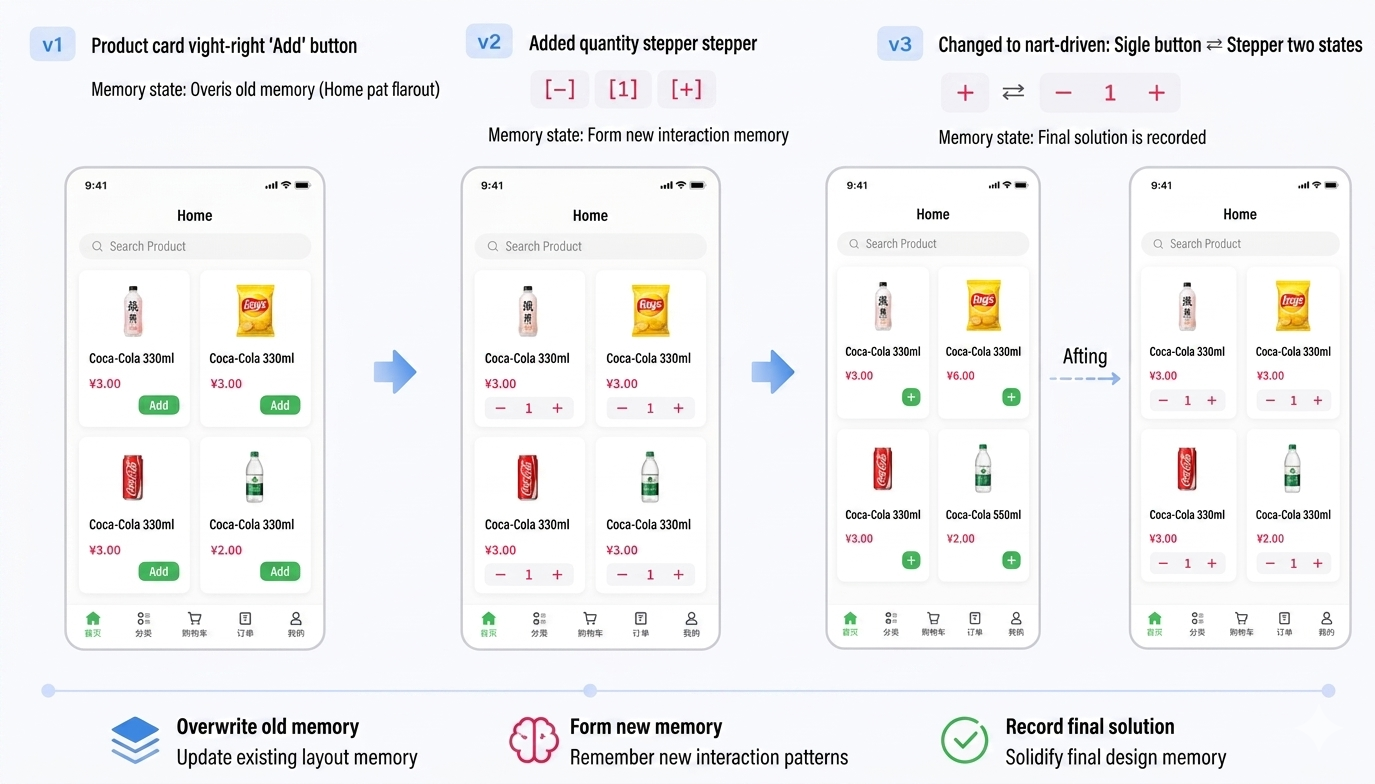
Three UI iterations, with Memoria's memories updating along the way:
| Iteration | Change | Memory Status |
|---|---|---|
| v1 | Added an "Add" button to the bottom-right of product cards | Overwrote old memory (Home layout) |
| v2 | Added a quantity stepper [-][1][+] next to the button | Formed a new interaction memory |
| v3 | Switched to cart-driven: two states — single + ⇄ stepper | Final solution recorded |
Memoria Memory —
019e34299c5e7d90aedf2034f6164828(Home Cart Interaction — Final Version)store-app frontend Home cart interaction: each product card shows a circular theme-colored "+" button in the bottom-right by default. Clicking calls CartContext.addItem; once the item is in the cart, the UI automatically switches to a stepper [−][quantity][+]. When the stepper's "−" reaches 0, it calls removeItem to delete the cart item and the UI reverts to a single "+". Cart quantity comes from CartContext (useCart), and the NavBar badge syncs automatically. Home.tsx does not call the API directly — all actions go through CartContext's addItem/updateQuantity/removeItem methods.
6. Evolution of the Home Page Layout
The Home page went through a transition from a simple list to a mini-program-style category sidebar:
Memoria Memory —
019e2c1064fe7f43afb48e532a314780(Home Page Layout)store-app Home layout changed to mini-program style: 90px category sidebar on the left (icon + name, highlighted selected state); product list grouped by category on the right; clicking a left-side category auto-scrolls to the corresponding section. The selected category updates automatically on scroll.
Memoria Memory —
019e2c1084bf7930b8dff38c796c25f6(NavBar Back Button)store-app NavBar shows a ← back button (calls navigate(-1)) on non-Home pages; hidden on the Home page. Uses react-router's useLocation to determine the current path.
Where Memoria Excels
✅ Context Persistence: No Information Lost Across Conversations
The most practical use case is maintaining context across conversations. Development of store-app spanned multiple days and multiple conversations. Each time a new session started, Memoria automatically provided the project background — no need for me to repeat myself.
Concrete example: Running "list my memoria memories" immediately returned 12 relevant memories, including project structure, port configuration, API endpoints, etc. I could jump straight into coding with zero warm-up.
✅ Cross-Device Recovery: No Fear of Power Outages
An unexpected scenario validated Memoria's "disaster recovery" value. On Friday evening (May 15th), the office lost power and I couldn't connect to my office machine. My home machine had neither the store-app codebase nor any open IDE context.
But because Memoria's memories are server-side persistent, opening a new conversation on my home machine and running memory_list immediately surfaced all store-app-related memories — project structure, configuration approach, recent changes, even the coffee shop seed data details. No VPN back to the office to find the code, no trying to recall "where did I leave off last time?"
This amounts to having a backup of the "development thought process" that exists outside the code itself. A Git repository can achieve cross-device access via remote hosting, but context like "why was it designed this way," "what problems did I hit last time," and "what's the port number" is exactly what Git doesn't record — and Memoria does.
✅ Failure Logging: Precise and Searchable
"The three pitfalls at backend startup" is Memoria's ideal use case. This type of information has three characteristics:
- Costly to diagnose (the three issues masked each other)
- Low recurrence frequency (might not surface again for weeks)
- Too lightweight for formal documentation (not worth writing a dedicated wiki entry)
Memoria captures this failure information automatically, in a concise and searchable format. Picking the project back up a month later, a single search brings it all back.
✅ Seed Data: Useful Even for Structured Data
The coffee shop seed data (20 products, prices, descriptions) was also captured. It's not code-level precision, but during a discussion it allows you to quickly retrieve "what products does this business type have, what's the price range" — without having to dig into the coffee.go source.
✅ Branch Isolation: Experimenting with the Coffee Branch
Memoria's branch feature allows experimentation without polluting main. The coffe branch was created to record experimental memories related to the coffee shop. While the branch is currently empty (memories were merged into main), this isolation mechanism is conceptually sound — analogous to how Git branches isolate code.
Where Memoria Falls Short
❌ Passive Recording — Requires Manual Maintenance
Memoria is not "automatic memory of everything." Most memories need to be explicitly saved by me via the memory_store tool. If I forget to save, critical information is lost.
Concrete example: Fixing the "NavBar cart badge out of sync" bug (Home.tsx was calling the API directly instead of going through CartContext) — the root cause and fix were worth recording. But I genuinely had to manually call memory_store.
❌ Old Memories Don't Update Automatically
The project evolves, but old memories don't sync automatically. For example:
- Memory
019e2c06527478619e2bafb8d81accf9says "port 8090," but the actual port is now 8080 +.envconfiguration - Memory
019e2c0909f57281b60cffa6f6dcdb84says "BASE_URL is http://localhost:8090/api," but that's now historical
While memory_correct exists to fix this, the "notice it's stale → correct it" loop needs to be driven by a human. In a fast-moving project, stale memories accumulate quickly and easily create "memory noise."
❌ No Code-Level Precision
Memoria records semantic summaries, not code. For example, "fix GORM bug" only captures the root cause and resolution, but not the specific code snippet — the exact syntax and location of NamingStrategy{SingularTable: true}. If the code were lost, memories alone would not be enough to fully reconstruct it.
❌ Cross-Branch Memory Migration Is Not Intuitive
When creating the coffe branch, I had already done the coffee shop development on main before creating the branch. At that point, main already had the coffee shop memories while the coffe branch was empty. There is no one-click tool to migrate memories to a new branch.
❌ Still "My Memory Alone"
Memoria is currently private and cannot be shared in team collaboration. If another developer takes over store-app, they won't see my memories. Unlike Git commit messages — which are team-shareable — Memoria memories currently are not.
Areas for Improvement
Based on real-world usage experience, here are some directions for improvement.
🔮 Bulk Memory Export with Sharing Support
Current memories are private and local to one user. If memories related to a project could be bulk-exported, it would enable:
- Team handoffs: A new developer taking over store-app could import a memory package and instantly gain context about the project background, known pitfalls, and design decisions
- Offline archiving: After a project wraps up, export memories as a document to serve as part of the project knowledge base
Export formats could be Markdown (readable and version-control-friendly), JSON (programmatically processable), or displayed as a list in an Agent conversation. In essence, this would upgrade Memoria from a "personal note-taking tool" to a "knowledge base."
🏷️ Memory type and tier: Currently Only Used for Filtering — Much More Is Possible
Memoria memories have two important metadata fields:
| Field | Current Values (seen in store-app) | Current Usage |
|---|---|---|
type | semantic (most), procedural (2 entries) | Used only as a filter condition in memory_list |
tier | T1 (saved in this article), T3 (auto-saved early on) | Only affects governance cleanup policy |
Current problem: The potential of these two fields is far from being utilized.
For example, type could be expanded into a more fine-grained taxonomy:
| Suggested Type | Suitable Content |
|---|---|
semantic | Design decisions, architectural trade-offs |
procedural | Startup steps, operational workflows |
bug_fix | Troubleshooting and fix records |
seed_data | Seed data, configuration inventories |
ui_spec | UI interaction specifications |
config_note | Configuration notes, environment variables |
If users could choose the memory type when saving via the Agent (instead of everything defaulting to semantic), filtering during retrieval would become precise. For example: "show only bug_fix type memories" would surface only startup failures, order table name issues, and similar problem records.
The same applies to tier. Currently T1 represents "facts explicitly confirmed by the user" and T3 represents "summaries inferred by AI." If users could actively label confidence when saving memories — for example, explicitly promoting a tier when correcting an old memory — then governance cleanup could more accurately retain high-value information and discard speculative content.
Actions users can take on their side:
- Specify type when saving memories (
memory_storetool supports thememory_typeparameter) - Manually promote tier to T1 for important memories
- Periodically use
memory_correctto fix stale memories, preventing T1 information from becoming noise
💡 From Passive to Active: IDE-Style Memory Association Hints
This is the biggest gap between where Memoria is today and its ideal form.
Current interaction model: The user actively uses memory_store to save memories, and actively calls memory_list or memory_search to retrieve them. Memories exist silently in the background and never proactively surface. This is a "user pull" model.
Desired interaction model: Similar to IDE code completion. When a user types a few lines into the Agent, Memoria automatically searches for related memories in the background and proactively surfaces suggestions near the input box:
User input: "What is the current backend port for store-app?"

Memoria proactively suggests:
  🔍 Related memories (3):
  · Port moved to config-driven: SERVER_PORT env default 8080 (T1)
  · Port was previously changed to 8090 (stale) (T3)
  · Frontend VITE_API_BASE_URL configuration (T1)
This experience is analogous to:
- VS Code's IntelliSense: Type a few characters and a dropdown appears with completion suggestions
- Google Search suggestions: Real-time associations appear as you type
- Notion's backlinks: When opening a page, automatically surfaces "which pages reference this one"
In real development, it's easy to forget that a memory already exists and end up re-describing and re-diagnosing the same issue. If Memoria could proactively remind me while I type — "you already solved this GORM table name issue last week; the reason was…" — that experience of "appearing exactly when needed" would transform Memoria from an "occasional reference notebook" into an "indispensable development companion."
Memoria should not merely be a passive storage box. It should act like IDE code hints — proactively surfacing the most relevant context at the exact moment the user needs it most.
🧬 Adding a Code Dimension to Memories: Linking diff, commit, and branch
Current memories are "plain text" — they record semantic descriptions with no structured association to the codebase. This is the most fundamental split between Memoria and Git.
Real scenario: There is a memory that records "coffee shop seed data: Slow Time Coffee, #6F4E37, 4 categories, 20 products." But to find out which specific file and lines of code implement it, you have to go dig through Git log. If a memory could be directly linked to:
- Git diff: The code change corresponding to this memory (the specific content of the
Seed()method incoffee.go) - commit ID:
86bdfe7 add coffe— one click to jump to the commit page on GitHub - branch: Which feature branch it belongs to (
add-coffe) - Specific file and line numbers:
server/internal/config/business/coffee.go:15-65
Then a memory would transform from a "verbal description" into a "code entry point."
Deeper value: When an Agent later retrieves a memory, instead of returning only a passage of text, it could use code diffs to supplement and validate the memory. For instance, when I ask "how was the coffee shop added to store-app?", the Agent would not only answer with a semantic summary, but also display the key diff:
+// server/internal/config/business/coffee.go
+type CoffeeLoader struct{}
+
+func (l *CoffeeLoader) Name() string {
+    return "coffee"
+}
+
+func (l *CoffeeLoader) Seed(db *gorm.DB) error {
+    // 4 categories, 20 products
+    store := model.Store{Name: "慢时光咖啡", ThemeColor: "#6F4E37"}
+    ...
+}
Improvement to the existing workflow: This would require memory_store to support attaching structured metadata when saving a memory, for example:
memory_store
  content: "Coffee shop seed data..."
  code_refs:
    - type: diff
      value: 86bdfe7..HEAD -- server/internal/config/business/coffee.go
    - type: commit
      value: 86bdfe7
    - type: branch
      value: main
In this way, memories and code would no longer be two independent systems — they would point to and corroborate each other. Git answers "what changed," memories answer "why," and code references stitch the two together.
Memoria and Git: Complementary, Not Competing
In real development, Memoria and Git record information at different layers:
| Dimension | Git | Memoria |
|---|---|---|
| Recording granularity | Line-level code diff | Semantic-level summary |
| Structure | Directed acyclic graph (DAG) | Flat list + branches |
| Retrieval method | Filename / commit message | Semantic search |
| Automatic recording | ✅ (via active commit) | Semi-automatic (requires manual store) |
| Cross-device | ✅ (remote repository) | ✅ (server-side persistence) |
| Best suited for | "What code changed" | "Why it changed," "What problems were encountered" |
Memoria's strength is in recording what doesn't fit in a Git commit message: the troubleshooting process behind an issue, the trade-off analysis between multiple solutions, the record of failed attempts.
Example: The Git commit 86bdfe7 has only two words in its message: "add coffe." The Memoria memory about this commit contains:
Memoria Memory —
019e315011387c30850f613b41f6a6efSolution C — frontend and backend config file control. Backend BUSINESS_TYPE environment variable (coffee/grocery), frontend VITE_BUSINESS_TYPE. Business type configurations in server/internal/config/business/ directory, implemented via interface + registry pattern… Seed data idempotent design (checks store table row count). Coffee shop data: Slow Time Coffee (#6F4E37), 4 categories, 20 products.
None of this information exists in Git log.
Summary
Memoria's role in a real project: A "developer's personal memo system."
Suitable use cases:
- Maintaining context across conversations
- Recovering development state across devices (power outages / machine switches)
- Recording diagnosed issues and their solutions
- Recording design decisions and trade-offs
- Recording structured information such as seed data
Unsuitable use cases:
- Replacing Git (does not record code diffs)
- Replacing documentation (too granular, lacks structure)
- Team collaboration (currently private)
- Automated CI/CD (no integration capability)
Overall experience: Across store-app's 3 commits and multiple conversations, Memoria genuinely reduced the time spent re-describing project background, and provided quick anchors during troubleshooting. The cross-device recovery capability was an unexpected highlight.
But it remains in the "passive tool" stage — it requires the user to consciously maintain memories, and memories won't proactively remind you of their existence. The future direction is clear: bulk export and sharing transforms memories from personal notes into transferable knowledge; richer type/tier semantics makes retrieval more precise; IDE-style proactive association ensures memories appear exactly when needed; code dimension linking stitches memories to diffs, commits, and branches — using code to corroborate memories and memories to navigate code. When that day comes, Memoria won't just be a "notepad" — it will be a true "development companion."
Think of it as an "enhanced Git commit message + issue tracker," and the positioning is accurate. But it can go much further.
This article is based on the actual development process of the store-app project. Project repository: https://github.com/daviszhen/store-app. Memoria memories can be found in the main and coffe branches.